In April 2026, new accessibility legislation goes into effect, requiring all digital documents to meet updated accessibility standards. This training session will equip staff with the knowledge and tools needed to create accessible documents using Microsoft Office applications such as Word, Excel, and PowerPoint.
Participants will learn how to use the built-in Accessibility Checker, identify and correct common accessibility issues, and apply best practices to ensure content is readable and usable for all audiences, including individuals with disabilities.
In April 2026, new accessibility legislation goes into effect, requiring all digital documents to meet updated accessibility standards. This training session will equip staff with the knowledge and tools needed to create accessible documents using Microsoft Office applications such as Word, Excel, PowerPoint and Outlook.
Participants will learn how to use the built-in Accessibility Checker, identify and correct common accessibility issues, and apply best practices to ensure content is readable and usable for all audiences, including individuals with disabilities.
In April 2026, new accessibility legislation goes into effect, requiring all digital documents to meet updated accessibility standards. This training session will equip staff with the knowledge and tools needed to create accessible documents using Microsoft Office applications such as Word, Excel, PowerPoint and Outlook.
Participants will learn how to use the built-in Accessibility Checker, identify and correct common accessibility issues, and apply best practices to ensure content is readable and usable for all audiences, including individuals with disabilities.
In April 2026, new accessibility legislation goes into effect, requiring all digital documents to meet updated accessibility standards. This training session will equip staff with the knowledge and tools needed to create accessible documents using Microsoft Office applications such as Word, Excel, PowerPoint and Outlook.
Participants will learn how to use the built-in Accessibility Checker, identify and correct common accessibility issues, and apply best practices to ensure content is readable and usable for all audiences, including individuals with disabilities.
In April 2026, new accessibility legislation goes into effect, requiring all digital documents to meet updated accessibility standards. This training session will equip staff with the knowledge and tools needed to create accessible documents using Microsoft Office applications such as Word, Excel, PowerPoint and Outlook.
Participants will learn how to use the built-in Accessibility Checker, identify and correct common accessibility issues, and apply best practices to ensure content is readable and usable for all audiences, including individuals with disabilities.
The U.S. Department of Justice – Civil Rights Division and U.S. Department of Education Office for Civil Rights have provided notice to colleges and universities across the country about new accessibility requirements that take effect April 2026.
The new accessibility requirements will help both students with and without disabilities, as they follow a universal design approach. If a course is found to not meet the new accessibility requirements, both the institution and instructor can be held liable.
The new DOJ rules makes this a legal requirement, not just a best practice. For more detailed information, review an article from WCET.
As a result, it is important that instructors check their courses to make certain the content they have posted are meeting these standards as soon as possible, to allow time to fix any content before the April 2026 deadline.
What does this mean?
All digital content students use within a D2L course must be accessible to students with disabilities. This includes anything students are expected to read, watch or interact with within their D2L courses, such as videos, PDF’s, PowerPoint Slides, Word documents, online textbooks, links to outside websites, lecture recordings, just to name a few. For example:
Videos must have captions
Images must have alt text
PDF’s must be properly formatted (not just scanned images)
Text must be readable (not tiny fonts or bad color contracts)
All content, including PowerPoint slides, Word documents, etc. must work with screen readers
Tools Available to Help Instructors Meet Accessibility Requirements:
Blackboard Ally:
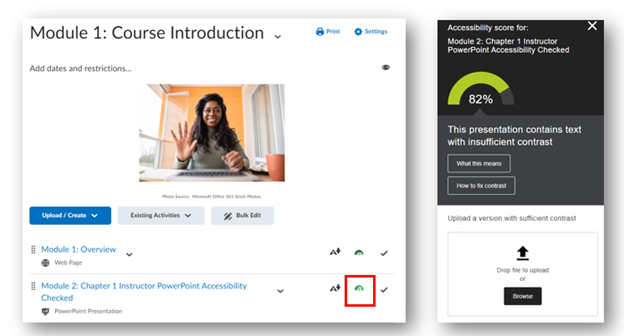
Blackboard Ally (within D2L) checks all content instructors upload to their D2L course and checks if it meets these accessibility standards. It provides instructors a score for individual content and the course as a whole. If content scores low, Ally provides feedback to instructors on how to fix their content to meet accessibility standards.
It is best practice that all content score 90% or higher.
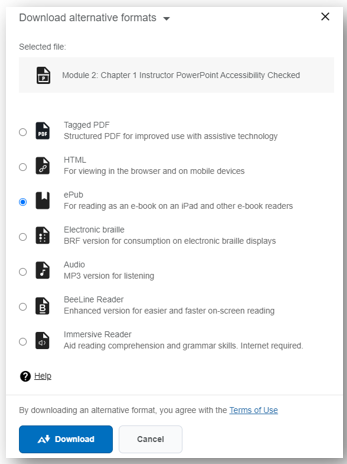
Ally also automatically converts content instructors upload to D2L to different formats. For example, if a student would like a PowerPoint slide to be in audio format, they have that option.
D2L Medial Library:
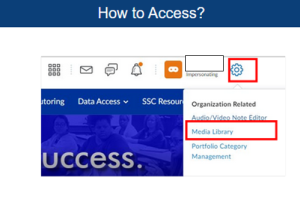
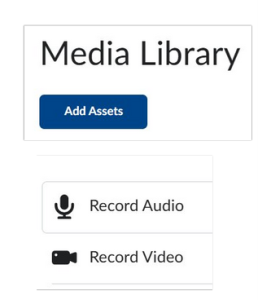
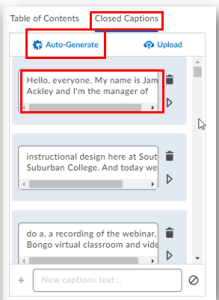
The D2L Medial Library provides for automatic closed caption of videos uploaded by instructors:
Scanning Assistance:
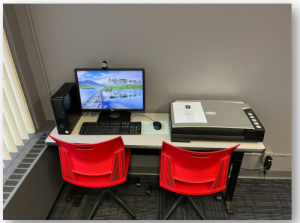
The Teaching and Learning Center has a Book Edge Scanner for faculty to use. This Book Edge Scanner will scan documents (such as pages from a textbook) to meet accessibility standards.
Would you like to learn more about the new accessibility requirements or assistance in fixing course content. Check out the Teaching and Learning Center’s Training Calendar to attend our Design for All workshops or schedule a one-on-one consultation with a member of the TLC staff.